Weightmania Pro and Mobile Tutorials
|
This page provides tutorials for Weightmania Pro and Weightmania Mobile. It includes an overview of Weightmania Pro's main tools plus an online user guide.

Online User Guide
Use the link below to access a web-based version of the Weightmania Pro user guide. This is also available under the Weightmania Pro Help menu (see "Contents...").
Weightmania Pro User Guide
Video Tutorials
The following section provides video tutorials for Weightmania Pro and Weightmania Mobile. These videos were created on Windows XP, Windows Vista and Palm. Since features are nearly identical on every platform, they can also be used by Mac users.
| Weightmania Pro: |
|
Recording a meal using the input wizard. |
Play |
02:46 |
See how to record meals quickly using the meal table input wizard. Weightmania uses a live, interactive search so you only need to type the first 2-3 letters of each word. |
|
A faster way to record meals using the favorites list. |
Play |
01:11 |
Use the meal table favorites list to enter meals faster. Weightmania is the only leading product on the market that lets you drag and drop multiple foods at the same time. The favorites list is created for you automatically. Since most people eat the same 20 to 30 foods year-round, you can soon enter all your meals in seconds. |
|
Recording a running workout |
Play |
03:24 |
Weightmania lets you record multiple cardio workouts per day. Just insert a new cardio tab for workout. Weightmania's cardio workout form was designed by a long-distance runner with more than 20 years of experience. |
|
Entering a weight training workout |
Play |
04:50 |
Learn how to record a weight training workout fast using the input wizard. You can also create predefined workouts or templates that let you record workouts in one click. |

|
| Weightmania Mobile: |
|
Recording information and using major tools. |
Play |
10:29 |
Learn how to record information and use the major tools in Weightmania Mobile. This video was created for the University of Connecticut Human Peformance Lab. Colors were altered to allow this to be used on LCD overhead projectors. |
|
Main Tools Overview
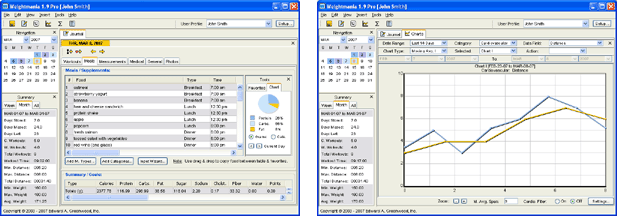
The tables below describe the main tools in Weightmania Pro and Weightmania Mobile. In Weightmania Pro, this information is also available under the main help menu. See "Help | Contents".
| Weightmania Main Tools: |
|
Journal |
Records
daily workouts, meals, measurements, photos, general and medical
information.
|
|
Calendar |
Displays
information and progress by month or for an
entire year; squares are color-coded by
workout/activity type. |
|
Charts |
Displays
information and progress on up to four charts at
the same time; provides five types of graphs, data smoothing and
a powerful zoom feature. |
|
Statistics |
Displays
detailed statistics (minimums, maximums, averages, totals and counts)
for any date range; includes every field in the
journal; provides an option to show statistics by
week. |
|
Reports |
Creates
detailed reports using information recorded in
the journal; reports can be generated in text or
HTML, then saved or printed. |
|
Nutrition |
Finds
and displays up to 50 nutrients in any food;
searches an 8,000-food USDA database or your own
custom food database. |
|
Find |
Powerful
search finds information fast; searches
every available field in any date range
instantly. For example, find every day in
the journal where you ran more than 5 miles,
entered specific notes or ate a particular food. |
|
| Weightmania Special Tools: |
|
Recipe
Manager |
Organize
and store an unlimited number of recipes. Stores recipes,
directions, preparation time, total time, number
of servings, a one to five star rating, detailed
nutrition information and digital photos.
Arrange, label, rotate, resize and
print any image. Print details for one
recipe or a complete list of all your
recipes. Cut, copy and paste a single
recipe or an entire collection. Easily
share recipes with other people. Includes
30 predefined categories arranged in
alphabetical order. |
|
Grocery
List Manager |
Create
and store a detailed grocery shopping list.
Stores the
description, quantity and price for each
item. Automatically calculates the total
cost anytime you enter, delete or modify an
item. Helps you eat better and saves time
at the supermarket. Print details for one
item or a complete shopping list that you can
take to the store. Includes eight
predefined categories, including a folder for
coupons. |
|
Web
Link Manager |
Manage
your favorite fitness and health related Web
links. Stores the name of each link, a detailed
description and its URL. Display any Web
page or document in one mouse click. Keeps all your fitness links in one place
and stores more detail than most Web browsers.
Print details for one link or a complete list of
all your links. Easily share links with
other people. |
|
Training
Equipment Manager |
Track
and organize your training equipment. Stores the name of
each item, the date it was first used, a
detailed description and an unlimited number of
digital photos. This tool is linked to the
Weightmania™ journal. By selecting
equipment used after each workout, the
statistics tool will count the number of
times each item was used, calculate minimum,
maximum, average and total use time, and
calculate the total mileage. It works for
any date range. Helps determine when its
time to replace running shoes, bicycle tires and
clothing. Print details for one item or a
complete list of all your equipment. |
|
Course/Route
Manager |
Organize
your running, cycling, walking and inline skating
routes. Stores the
name of each course or route, the distance, a
detailed description and an unlimited number of
digital photos and maps. Arrange, label, rotate, resize and print any
image. This tool is linked to the
Weightmania™ journal. Anytime you record
a cardiovascular workout, select the route name
from a list to automatically fill in fields and
save time (see Input Wizard). Print details for one route or
a complete list of all your routes. |
|
| Weightmania Fitness Calculators: |
|
Body
fat calculator |
Calculates
% body fat accurately and fast with no special
tools; automatically interprets the result and
tells how you rate. |
|
BMI
calculator |
Calculates
body mass index (a widely accepted measurement
of weight status); automatically interprets
result and tells how you rate. |
|
BMR
calculator |
Calculates
basal metabolic rate (the number of calories
your body burns while at rest). |
|
Calories
burned calculator |
Calculates
calories burned for 240 different activities,
for any amount of time and body weight. |
|
Required
daily calories calculator |
Calculates
the number of calories you need daily, based on
your activity level. |
|
Target
heart rate calculator |
Calculates
the range your heart rate should be in during
cardio. workouts for maximum safety and
benefits. |
|
D.T.P.S.
calculator |
Calculates
distance, time, pace and speed after
cardiovascular workouts; can also be used for
planning and estimating workouts. |
|
Splits
calculator |
Calculates
splits for any distance or interval; ideal for
race planning or anytime you want to maintain an
even pace during training. |
|
Arithmetic/conversion
calculator |
42-key
calculator for basic and advanced calculations;
performs a wide range of conversions between
metric and English. |
|
|
|